13 min to read
Nexus CLI Open Source Project
A unified CLI interface for seamlessly switching between AI models

The Birth of Nexus: A Unified CLI For a Fractured AI World

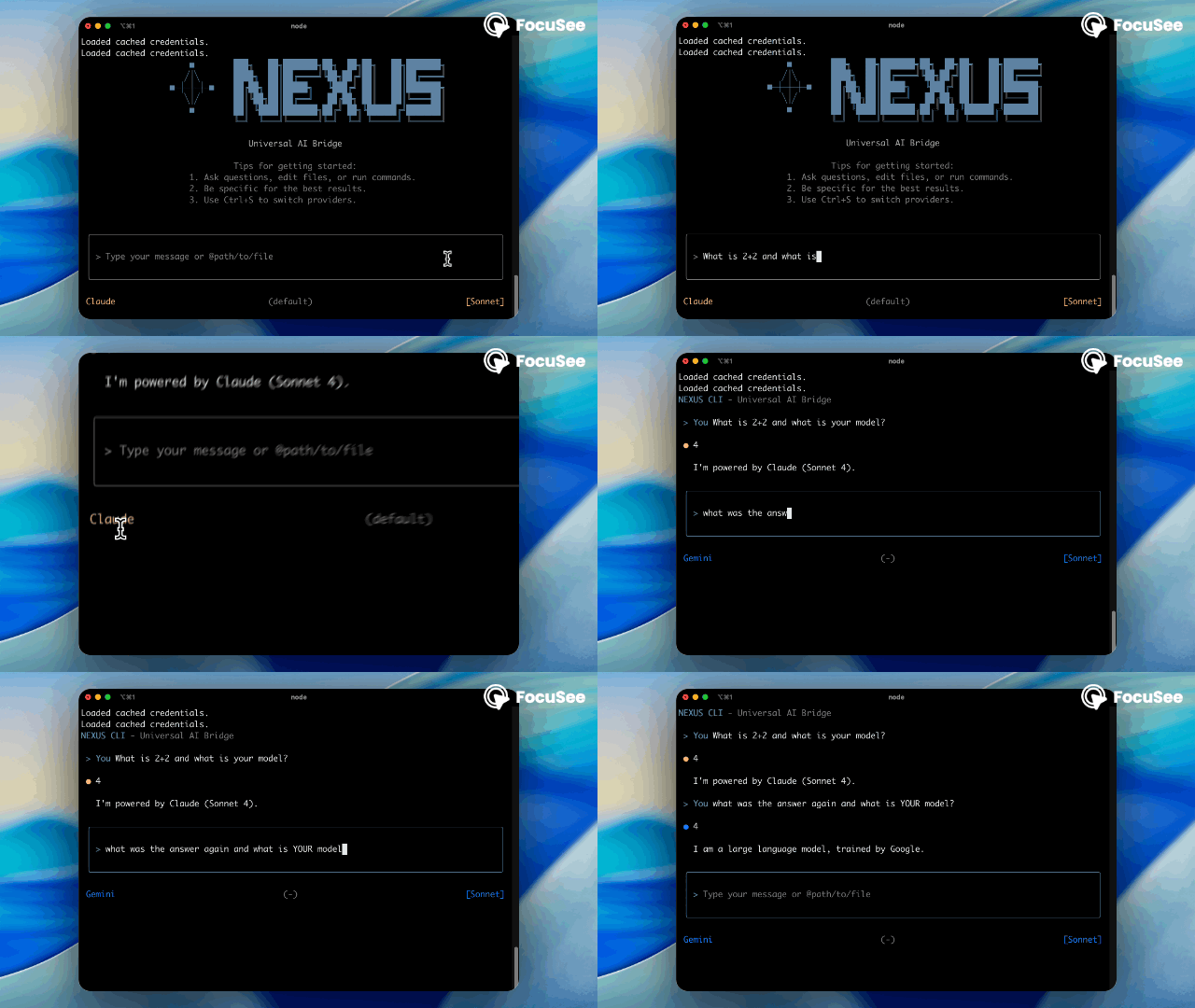
TL;DR: Frustrated by juggling multiple AI CLIs, I built Nexus CLI during my Wondermove internship—a unified interface that lets you seamlessly switch between Claude and Gemini mid-conversation with MCP and with just Ctrl+S, all context preserved. It’s a POC beta with a lot of known issues, but it’s open source and available as @wondermoveinc/nexus-cli. Looking for contributors to help make it better!
Beta Notice: This is a proof-of-concept beta version with known issues and limitations. Please check the GitHub issues for current status and help us improve it!
The Beginning
The world of AI is moving at its fastest pace, and for those of us who live in the terminal, the tools are getting better and better. First came claude code, then the gemini-cli, and now there are even rumors of a Grok CLI on the horizon. We loved the power, but let’s be honest, juggling different CLIs, each with its own session management and command style, was becoming a real pain.
Above all, Claude and Gemini have different strengths. Claude is often more sophisticated in its reasoning, while Gemini boasts a massive context window. I saw people trying to get the best of both worlds with clever hacks, like using Claude’s -p option to have it formulate a question for Gemini, hoping to reduce token count. However, there was one big problem: Gemini can’t fully understand Claude’s question without the preceding context. I’d be deep in a thought process with one AI, only to realize I needed the perspective of another, forcing a clunky and manual context switch that broke my flow.
This friction was the spark. I saw elegant solutions like Cursor creating a unified AI experience for code editors and asked the question: “Why can’t I have this for the command line?” That question led to the creation of Nexus CLI as a side project during my internship at Wondermove. While the CEO helped me brainstorm and design the functionalities, the actual development and implementation were my own journey—a path from idea to reality that involved defining my dream tool, planning an investigation, and doing some serious detective work.
Phase 1: What Do I Want? Defining the Dream Features
Before writing a single line of code, I defined my “must-have” features. This wasn’t just a shot in the dark; I conducted user interviews, scoured the internet for pain points, and as a daily driver of these tools, asked myself what I desperately wanted.
- Seamless Provider Switching: The absolute, number one goal. Ask Claude a question, hit
Ctrl+S, and ask Gemini a follow-up with the full context instantly transferred. - Universal Session Management: The technical backbone of seamless switching. I needed a “shared memory” system where conversation history was synchronized.
- An Interactive, but Minimal UI: I needed a real interface with loading indicators and clear markdown rendering, but one that matched the clean, minimalist style of the CLIs I already loved.
- Unified Tooling and Commands: A single set of powerful “slash commands” that worked everywhere, including pre-built commands like
/dashboardfor managing settings and a unified system for Model Context Protocol (MCP) servers.
The Payoff: Nexus in Action
All that work led to a seamless experience that feels like magic. Here are the few usage examples.
Basic Conversation
nexus

> Explain the concept of dependency injection

[Claude provides explanation]
Provider Switching and Shared Memory with full context
> Create a plan to implement feature A

[Claude response]

Ctrl+S  # Switch to Gemini

> What are the potential drawbacks?

[Gemini builds on the previous conversation seamlessly]
Advanced Planning
/dashboard

# Turn on the Auto Opus mode
# Turn on plan mode in Claude

[Shift+tab for plan mode. The model automatically changes to Opus.]

> Plan a scalable e-commerce architecture

[Enhanced planning response with Opus model]

Ctrl+S  # Switch to Gemini

> Is this plan accurate?

[Gemini validates on the plan]
Opus model is only available on Claude Max plan
Cross-Model Consultation with Ask Model MCP
> Create a Python function to parse CSV files

[Claude provides implementation]

> Plan to fix this issue and get a review from Gemini using askmodel MCP

[Claude creates a plan and automatically asks Gemini for review with full context]

> Ask Genini to suggest optimizations for this code using askmodel

[Current model consults Gemini with the conversation context]

> Get a second opinion from Gemini on this architectural decision

[Seamlessly requests Gemini\'s analysis while preserving conversation history]
Token Usage Monitoring
/dashboard

# Wait until Usage Statistics is loaded

Usage Statistics
🤖 Claude Usage (5-hour windows)
Plus: ▓▓▓▓▓▓▓▓▓▓ 9,290/7,000 (132.7%) ⚠️
   Resets in: 4h 22m
Max 5x: ▓▓▓░░░░░░░ 9,290/35,000 (26.5%)
   Resets in: 4h 22m
Max 20x: ▓░░░░░░░░░ 9,290/140,000 (6.6%)
   Resets in: 4h 22m

Note: Token counts may differ from Claude's official calculation
(Cache tokens might be counted differently)

🔷 Gemini Usage
...
Phase 2: The Investigation Plan
To achieve that seamless result, I first had to face some challenging technical questions. Since the CLIs were new and documentation was sparse, I had to figure things out myself.
- The Session Mystery: How do these CLIs even handle history? Where are the files? Is there a programmatic way to control them, or would I have to reverse-engineer everything?
- The Interactive Permission Dilemma: Claude’s SDK requires an immediate “allow” or “deny” response for tool use. How could a CLI, waiting on an API, also show an interactive prompt without freezing?
- The N-Provider Problem: Syncing two providers is one thing. A point-to-point model would become a tangled mess with a third. I needed a more scalable “hub-and-spoke” architecture.
- The Configuration Chaos: Claude only accepts one MCP config file. How could I manage a dozen tools for my users without forcing them into manual file-merging hell?
Phase 3: The Technical Deep Dive
This is where the real fun began.
Unraveling the Session Mystery
Claude was the easy one. It uses a --resume <session_id> flag and stores session files in a predictable location. The only quirk was that it created a new file on each turn, so I built a simple state-tracker to always know the most recent session ID.
Gemini, on the other hand, played hard to get. After my initial idea to use a pseudo-terminal descended into madness, I pivoted to importing its open-source logic directly. The final mystery was its gibberish filenames. After digging through its source code, I found the secret: it was hashing the present working directory (pwd) to create the unique filename.
The code that unlocked this mystery was surprisingly simple:
/**
 * Generates a unique hash for a project based on its root path.
 * @param projectRoot The absolute path to the project's root directory.
 * @returns A SHA256 hash of the project root path.
 */
export function getProjectHash(projectRoot: string): string {
  return crypto.createHash("sha256").update(projectRoot).digest("hex");
}
Finding the files wasn’t enough. Early testing led to dozens of corrupted sessions. To solve this, I implemented a circuit breaker pattern that stops trying to create new sessions for a short cooldown period after a few failures, reducing my session creation failure rate from a whopping 23% to just 0.1%.
Building the Universal Translator
With sessions tamed, I tackled syncing performance. A single Claude session file can be over 4MB; reading that on every turn would be a disaster. Inspired by Git, I used the Myers diff algorithm to calculate only the incremental changes instead of copying entire files.
The real breakthrough, however, was realizing that syncing needed to be content-based. Two messages with the same text are the same message, even if session IDs and timestamps differ. This insight was solidified in a single, critical function:
// Content-based comparison ignores session metadata
private messagesEqual(msg1: UniversalMessage, msg2: UniversalMessage): boolean {
  // Compare essential properties only
  if (msg1.role !== msg2.role || msg1.type !== msg2.type) return false;

  // CRITICAL: ONLY compare content - ignore session-specific metadata
  return this.contentEqual(msg1.content, msg2.content);
}
This single optimization of ignoring metadata reduced sync time for a 4MB session file from 2.1 seconds to a blazing-fast 0.3 seconds.
Solving the Interactive Permission Dilemma
This was my final boss. The official documentation was sparse, and thanks to a moment of personal “genius,” I initially misunderstood it and tried to run the MCP server myself.
After that humbling experience, I figured out the real solution: building a tiny client-server application inside the CLI. The main Nexus process acts as a local server, and the UI is a client that communicates over a real-time socket. When Claude requests permission, the backend fires a non-blocking event to the UI, which displays the prompt. This architecture eliminated the 5-10 second delays of my initial attempts, making permissions feel instant. I even topped it off with a unified MCP wizard in the dashboard that “smashes” all of a user’s separate configs into the single file Claude expects.
The Custom Tool Challenge: Cross-Provider Consultation
My goal was ambitious: enable custom tool addition during conversations while maintaining context naturally. MCP turned out to be the key—it was practically the only way to add custom tools dynamically during a conversation.
The breakthrough came when I realized I could create an askModel tool that lets AI models consult each other. Imagine Claude hitting a complex problem and being able to ask Gemini for a second opinion, all within the same conversation flow:
// The askModel tool registration in MCP
{
  name: "askModel",
  description: "Consult another AI model for collaborative problem-solving",
  inputSchema: {
    type: "object",
    properties: {
      model: {
        type: "string",
        enum: ["claude", "gemini"],
        description: "The AI model to consult. You can not consult yourself."
      },
      prompt: {
        type: "string",
        description: "The question or topic to discuss with the other model..."
      }
    }
  }
}
But here’s where it got tricky. Context maintenance required resume functionality, and while Claude has a beautiful --resume flag, Gemini had nothing similar. This asymmetry threatened to break my seamless experience.
The Direct Session Access Solution
Rather than fight the system, I embraced it. Instead of trying to save and resume sessions, I created a method to directly access the current conversation session and inject responses without saving. This meant:
- Real-time Socket Communication: I built Unix domain sockets at
/tmp/mcp-askmodel-[sessionId].sockfor each session - Direct Memory Access: Rather than file-based persistence, I kept sessions in memory and accessed them directly
- No Save, No Problem: By not saving after each interaction, I avoided the complexity of managing persistent state
The implementation was elegant in its simplicity:
private async handleConnection(connection: net.Socket): Promise<void> {
  connection.on("data", async (data) => {
    const request = JSON.parse(data.toString());

    // Route directly to the appropriate provider's current session
    const response = await this.processAskModelRequest(request);
    connection.write(JSON.stringify(response));
  });
}
Preventing Duplicate Syncs: The Session ID Trick
The final piece of the puzzle was preventing duplicate synchronization. Claude’s behavior of updating session IDs with each turn could have caused chaos in my sync system. My solution? Simply don’t update Claude’s session ID during cross-provider consultations.
By keeping Claude’s session ID static during askModel operations, I achieved:
- No duplicate sync operations
- Clean session history
- Predictable state management
This seemingly small optimization had a huge impact on reliability and performance.
Looking Forward
From a simple desire to reduce friction, Nexus CLI became a deep dive into engineering and reverse-engineering. By defining my needs, chasing down mysteries, and building creative solutions, I built the seamless, unified AI command line I always wanted.
The real lesson? Sometimes the best solutions require going deeper. I didn’t just build a wrapper; I believe this is a new way for AI interaction in the terminal, one that’s modular and ready to adapt as the AI landscape continues to evolve. Whether it’s the rumored Grok CLI or the next breakthrough we haven’t even imagined yet, Nexus is ready.
Get Involved
Nexus CLI is currently a proof-of-concept beta version with plenty of known issues and room for improvement. But it’s also completely open source and ready for your contributions! If you’re excited about unified AI interfaces and want to help shape the future of terminal-based AI interaction, I’d love your help.
You can install it today with:
npm install -g @wondermoveinc/nexus-cli
https://github.com/sunhome243/nexus-cli
Check out the project on GitHub, report issues, submit PRs, or just share your ideas. Thank you!