14 min to read
No Fine-Tuning, No Problem: Building 4 AI Features with AWS Well-Architected
A practical guide to the generative AI lifecycle
No Fine-Tuning, No Problem: Building 4 AI Features with AWS Well-Architected
Building production-ready generative AI applications requires more than just picking a model and writing prompts. It demands a structured approach that considers business value, technical feasibility, and long-term sustainability.
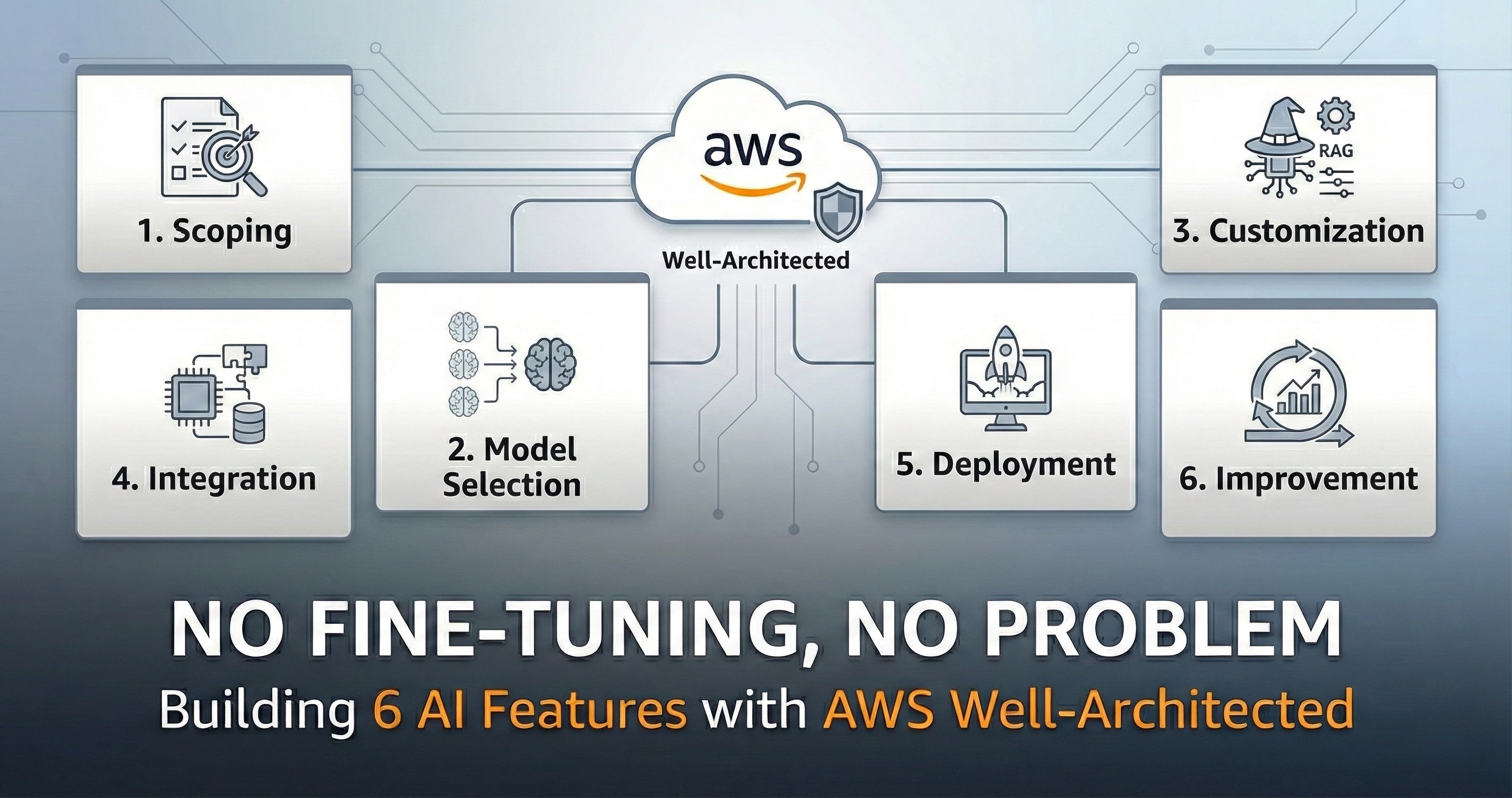
I used the AWS Well-Architected Generative AI Lens as my framework—a six-phase lifecycle that forces you to think before you build.

In this post, I’ll walk through each phase and show how I applied this framework to build four AI features for FlowSpace—an assignment management app for students and educators.
The Four Features
Before diving into the lifecycle, here’s what we’re building:
- AI Tutor (Socratic Engine) - Interactive problem-solving with MCQ verification and concept mastery tracking
- Brain Dump & Assignment Extraction - Extract actionable tasks from natural language or uploaded documents (syllabi, assignment sheets)
- Task Priority Engine - Intelligent task ranking with personalized recommendations
- Professor Fix Package & Tutor Visualization Engine - Educational content packages with misconception corrections, and interactive visualizations for tutoring
Each feature has different requirements, leading to different decisions at each phase.
Phase 1: Scoping - Start with the Business Problem
The scoping phase prioritizes understanding the business problem before any technical decisions. I ask: Is generative AI the right solution? What does success look like? What are the real costs?
How I Scoped Each Feature
AI Tutor (Socratic Engine)
The core question: What happens when the model gives a wrong answer?
This isn’t a simple Q&A chatbot. The Socratic Engine guides students through problems step-by-step, generates MCQs to verify understanding after each step, and tracks concept mastery using EMA scoring. It also provides meta-actions: Visualize (explain with diagrams), Breakdown (decompose problems), and Ask (free-form questions).
A wrong response doesn’t just waste time—it teaches incorrect concepts that the mastery system then reinforces. The cost of hallucination (student learning wrong material, eroded trust, academic harm) far exceeds the cost of using a premium model.
Success metric: < 2% factual error rate in step explanations and MCQ generation
Cost tolerance: High—accuracy trumps cost
Brain Dump & Assignment Extraction
The core question: What are the failure modes?
Two critical requirements emerged:
- No invented tasks - The model must never hallucinate tasks that weren’t mentioned
- No missed tasks - When all generated subtasks are completed, the original assignment must be done
Students might brain dump multiple times daily, so cost matters. But the real constraint was finding a model with low hallucination AND moderate completeness—cheap models that miss tasks or invent phantom tasks both fail the user.
Success metric: Zero invented tasks, > 95% task coverage
Cost tolerance: Low—but not at the expense of reliability
Task Priority Engine
The core question: Do we even need an LLM for this?
Initially, I planned to use an LLM for nuanced prioritization. But during evaluation, I realized: prioritization is fundamentally about applying consistent rules to structured data. The Eisenhower matrix (urgent/important) combined with custom variables (deadline proximity, estimated effort, current progress) could handle this deterministically—faster, cheaper, and more predictable than an LLM.
Success metric: User follows recommendation > 70% of the time
Cost tolerance: Zero—no LLM means no per-request cost
Professor Fix Package & Tutor Visualization Engine
The core question: What content do professors actually need?
Two distinct but related needs emerged:
- Fix Packages - Ready-made educational content to address common student misconceptions: examples that correct wrong mental models, clear explanations, and step-by-step corrections
- Tutor Visualizations - Interactive diagrams and visual aids that clarify abstract concepts during tutoring sessions
Both require strong code generation (for interactive visualizations) and pedagogical accuracy. The content must be correct—a visualization that reinforces a misconception is worse than no visualization at all.
Success metric: Generated content is pedagogically accurate and visualizations render correctly > 95%
Cost tolerance: Medium—quality over cost, but not unlimited
Scoping Summary
| Feature | Primary Risk | Cost Tolerance | Complexity |
|---|---|---|---|
| AI Tutor | Hallucination harms learning | High | Single model |
| Brain Dump | Invented or missed tasks | Low-Mid | Single model |
| Priority Engine | Inconsistent recommendations | Zero | No LLM needed |
| Fix Package/Viz | Pedagogical accuracy matters | Medium | Single model |
Phase 2: Model Selection - Match Capabilities to Requirements
There is no ‘silver-bullet’ model—it’s about matching capabilities to your specific constraints.
My Evaluation Process
I considered a wide range of options: AWS Bedrock models (Claude, Titan), OpenAI’s GPT-4o and GPT-5.2, Google’s Gemini family, and even on-device options like Apple’s Foundation Models.
Bedrock was tempting—easy cost management (I’m already on AWS), seamless integration with Lambda, unified billing. But many Bedrock models disappointed on price-performance ratio for my specific use cases.
Selection criteria:
- Price - Cost per token, free tiers, volume discounts
- Performance - Benchmarks relevant to my use cases (reasoning, extraction, code generation)
- Real user reviews - Community feedback on reliability, edge cases, API stability
- Hands-on testing - I ran my own evaluations with real prompts before committing
No amount of benchmark reading replaces actually testing with your data.
How I Selected Models
AI Tutor (Socratic Engine)
Requirements drove me toward higher-tier models:
- Strong reasoning for step-by-step explanations
- Low hallucination rate on factual content
- Ability to admit uncertainty rather than fabricate
I evaluated models on math and science tutoring benchmarks, specifically looking at reasoning trace quality, not just final answer accuracy. The model needed to “show its work” correctly.
The choice came down to Claude Opus 4.5 vs Gemini 3.0 Pro. While Opus 4.5’s pricing had dropped, Gemini 3.0 Pro was still more cost-effective. In practice, 3.0 Pro’s reasoning quality exceeded my expectations for tutoring use cases.
Selected: Gemini 3.0 Pro
Brain Dump & Assignment Extraction
This is fundamentally an extraction task, but with a tricky balance: the model must extract all relevant tasks (completeness) without inventing tasks that weren’t there (no hallucination).
Evaluation criteria:
- Hallucination rate - Must be near-zero for phantom tasks
- Coverage - Must capture all mentioned tasks
- Cost - High-frequency feature needs sustainable pricing
I tested multiple models including on-device options like Apple’s Foundation Models. Some cheap models had good coverage but invented tasks. Others never hallucinated but missed obvious items. Finding the right balance took about two months of iteration. (I’ll share the detailed lessons from evaluating Apple’s Foundation Models in a future post.)
Selected: Gemini 2.5 Flash (no thinking mode)
Professor Fix Package & Tutor Visualization Engine
Model longevity was a key concern. I tracked that Gemini 2.0 Flash deprecation was scheduled for February 2026. When 3.0 Pro was released, I knew 3.0 Flash was imminent. Rather than building on a soon-to-deprecate model, I waited.
When Gemini 3.0 Flash launched, I ran early evaluations on:
- Pedagogical accuracy in misconception explanations
- Interactive visualization code generation (React components)
- Structured concept breakdowns
The results were exceptional—better than models I’d used previously at similar cost points, especially for generating educational content with embedded code for visualizations.
Selected: Gemini 3.0 Flash
Model Selection Summary
| Feature | Model Selected | Key Selection Criterion |
|---|---|---|
| AI Tutor | Gemini 3.0 Pro | Reasoning quality at reasonable cost |
| Brain Dump | Gemini 2.5 Flash (no thinking) | Low hallucination + high coverage |
| Fix Package/Viz | Gemini 3.0 Flash | Educational content + visualization quality |
Phase 3: Model Customization - Make It Yours
I haven’t done traditional model customization (fine-tuning, RLHF) for these features yet. Instead, I’m building a modular prompt management system inspired by Claude’s Agent Skills.
The Architecture: Feature Lambdas + Bedrock Orchestrator
Each AI feature has its own Lambda endpoint with tailored prompts and functionality. For the Tutor (the most complex feature), a cheap Bedrock model acts as the orchestrator—selecting the most appropriate skill file from S3 based on the request.
Client Request
    → Feature-specific Lambda
    → (Tutor only) Bedrock orchestrator selects skill from S3
    → Assemble prompt with context + instructions
    → Call AI API (Gemini)
    → Validate response against schema
    → Return structured result
Why this approach?
- Feature isolation - Each Lambda has focused responsibility, easier to debug and scale independently
- Smart routing (Tutor) - Cheap orchestrator model picks the right skill without hardcoded logic
- Hot-swappable skills - Update prompts in S3 without redeploying
- Cost visibility - Per-feature usage tracking
(For why I chose Lambda over alternatives like AWS Bedrock AgentCore, see my infrastructure decision analysis.)
How I Customized Each Feature
AI Tutor (Socratic Engine)
The Tutor is the most complex feature, so it gets dedicated S3 skill definitions. The orchestrator routes tutoring requests to skills containing:
- Socratic questioning patterns - Never give direct answers; guide through questions
- MCQ generation rules - Questions must verify understanding, not just recall
- Concept extraction schema - Normalized concept names for consistent mastery tracking
The client sends the full conversation context with each request, keeping the Lambda stateless. Session state (current step, hint level, mastery scores) is managed on-device.
Guardrails (AWS best practice): I’m implementing guardrails to enforce academic integrity:
- No direct answers - Reject responses that give solutions without Socratic guidance
- Content filtering - Block harmful, inappropriate, or off-topic content
- Fallback behavior - When guardrails trigger, return a safe response (“Let’s approach this differently”) rather than failing silently
Brain Dump & Assignment Extraction
Strict schema enforcement was the primary customization:
Extract ONLY tasks explicitly mentioned or clearly implied.
Never invent tasks the user didn't reference.
If text is ambiguous, extract nothing rather than guess.
The prompt includes few-shot examples showing correct extraction (including examples of what NOT to extract). Output schema validation rejects responses that don’t conform.
Professor Fix Package & Tutor Visualization Engine
Prompt templates optimized for educational content generation:
- Misconception identification with correct mental model explanations
- Visualization specifications (what concept to illustrate, interaction patterns)
- Structured concept breakdowns with progressive complexity
- Output format for both explanatory text and embedded React visualization code
The key innovation: each “fix package” combines narrative explanation with interactive visualization code, generated together to ensure conceptual alignment.
Customization Summary
| Feature | Primary Technique | Core Focus |
|---|---|---|
| AI Tutor | S3 skill injection | Socratic patterns + MCQ generation |
| Brain Dump | Schema enforcement | Strict extraction-only rules |
| Fix Package/Viz | Template prompts | Paired explanation + visualization |
(In Progress) Phase 4: Development & Integration - Build the System
The model is often the smallest component of a production generative AI system. Integration brings everything together.
How I Built Each Feature
AI Tutor (Socratic Engine)
Clear separation between cloud and device:
- Lambda → AI inference only (Socratic responses, MCQ generation)
- On-device → Session state, mastery scores, history (SQLite)
- Visualizations → Custom Electron protocol (
flowspace-viz://) for secure sandbox rendering
Brain Dump & Assignment Extraction
Two input modes, same extraction pipeline:
Input (natural language OR uploaded document)
    → Lambda (multimodal LLM handles both text and document parsing)
    → Schema validation (reject if non-conformant)
    → DynamoDB update
    → Return structured tasks
No separate OCR step—the multimodal model handles document parsing directly. No RAG, no complex orchestration.
Professor Fix Package & Tutor Visualization Engine
Two distinct pipelines for different content types:
Fix Packages (static educational content):
Professor selects misconception topic
    → Lambda generates explanation + examples
    → Professor reviews and approves
    → Package uploaded to S3
    → Students access via pre-signed URLs
Tutor Visualizations (interactive diagrams):
Student requests visualization during tutoring
    → Lambda generates HTML/CSS/JS sandbox
    → VisualizationService renders via custom protocol (flowspace-viz://)
    → Interactive content runs securely in isolated frame
Fix Packages live in S3 with pre-signed URL access. Visualizations render on-demand via a custom Electron protocol to bypass CSP restrictions.
Integration Summary
| Feature | Architecture Pattern | Key Component |
|---|---|---|
| AI Tutor | Facade + services | On-device persistence + cache |
| Brain Dump | Minimal pipeline | Schema validation |
| Fix Package | Content generation | S3 + pre-signed URLs |
| Visualization | On-demand rendering | Custom protocol sandbox |
(Planned) Phase 5: Deployment - Ship with Confidence
Deployment for generative AI has unique challenges: external API dependencies, unpredictable scaling, and cost control.
Lambda Scaling
Lambda handles scaling automatically, but AI workloads have quirks:
- Cold starts - First request after idle period adds latency. For tutoring, this is acceptable (users expect some thinking time). For Brain Dump, I’m considering provisioned concurrency if it becomes an issue.
- Timeout configuration - AI inference can take 10-30 seconds. API Gateway has a default 29-second timeout, but you can request AWS to increase it to 5 minutes. Much simpler than implementing SQS-based async patterns for long-running requests.
- Memory allocation - More memory = faster CPU. I’m starting at 512MB and will adjust based on actual performance data.
AI API Unavailability
External AI APIs go down. Gemini has had outages. My mitigation strategy:
- Graceful degradation - Show cached/simpler responses rather than error screens. For Tutor: “I’m having trouble thinking right now. Try again in a moment.”
- Retry with backoff - 3 retries with exponential backoff before giving up
- No automatic failover to different models - Different models behave differently. I’d rather show an error than give inconsistent responses from a backup model I haven’t tested thoroughly.
Cost Control
- Per-user rate limits - Prevent runaway costs from heavy users or abuse
- CloudWatch alarms - Alert when daily spend exceeds thresholds
- Budget caps - AWS Budgets with hard limits as a safety net
Deployment Summary
| Concern | Strategy |
|---|---|
| Lambda scaling | Auto-scale, 60s timeout, monitor cold starts |
| API unavailability | Graceful degradation, retry, no auto-failover |
| Cost control | Rate limits, CloudWatch alarms, budget caps |
(Planned) Phase 6: Continuous Improvement - The Work Never Ends
Deployment is the starting point for learning from real users.
The Reality: Limited Visibility
I can’t see individual conversations between students and the AI tutor—nor should I, for privacy reasons. This limits traditional evaluation approaches like reviewing model outputs or analyzing conversation patterns.
Phase 1: User Feedback First
Initially, improvement will rely on explicit user feedback:
- Bug reports and feature requests
- Direct communication with early adopters
This is enough for an early-stage product. Real users will tell you what’s broken.
Phase 2: Telemetry at Scale
As the user base grows, aggregated telemetry becomes viable:
- Reuse rates - Are students returning to the tutor? Which features get repeated use?
- Rating systems - Star ratings for generated content, professor approval rates for Fix Packages
- Cost trends - Per-feature usage patterns to evaluate model upgrades
The key is measuring outcomes (did students improve?) rather than inspecting conversations.
Key Takeaways
Match Solution to Problem
Each feature had different requirements, leading to different choices:
- High-stakes accuracy → premium models (Gemini 3.0 Pro)
- Balanced extraction (no hallucination + high coverage) → mid-tier models with careful evaluation (Gemini 2.5 Flash)
- Educational content generation → evaluate new models early (Gemini 3.0 Flash)
Scoping Prevents Waste
The most important decisions happen before any code is written. Understanding your cost tolerance, failure modes, and success metrics determines everything downstream.
Customization is Mostly Prompts
None of these features required fine-tuning. Prompt engineering, output schemas, and context injection handled all customization needs. Start simple.
Build for Iteration
Every feature includes feedback mechanisms. You can’t improve what you don’t measure, and your first version won’t be your best.
Conclusion
The generative AI lifecycle provides a structured approach to building AI features that deliver real value. By working through scoping, model selection, customization, development, deployment, and continuous improvement for each feature, I made intentional decisions rather than defaulting to “use the biggest model for everything.”
The framework isn’t about finding one perfect approach—it’s about matching your approach to your problem. Different features justify different trade-offs, and that’s exactly how it should be.